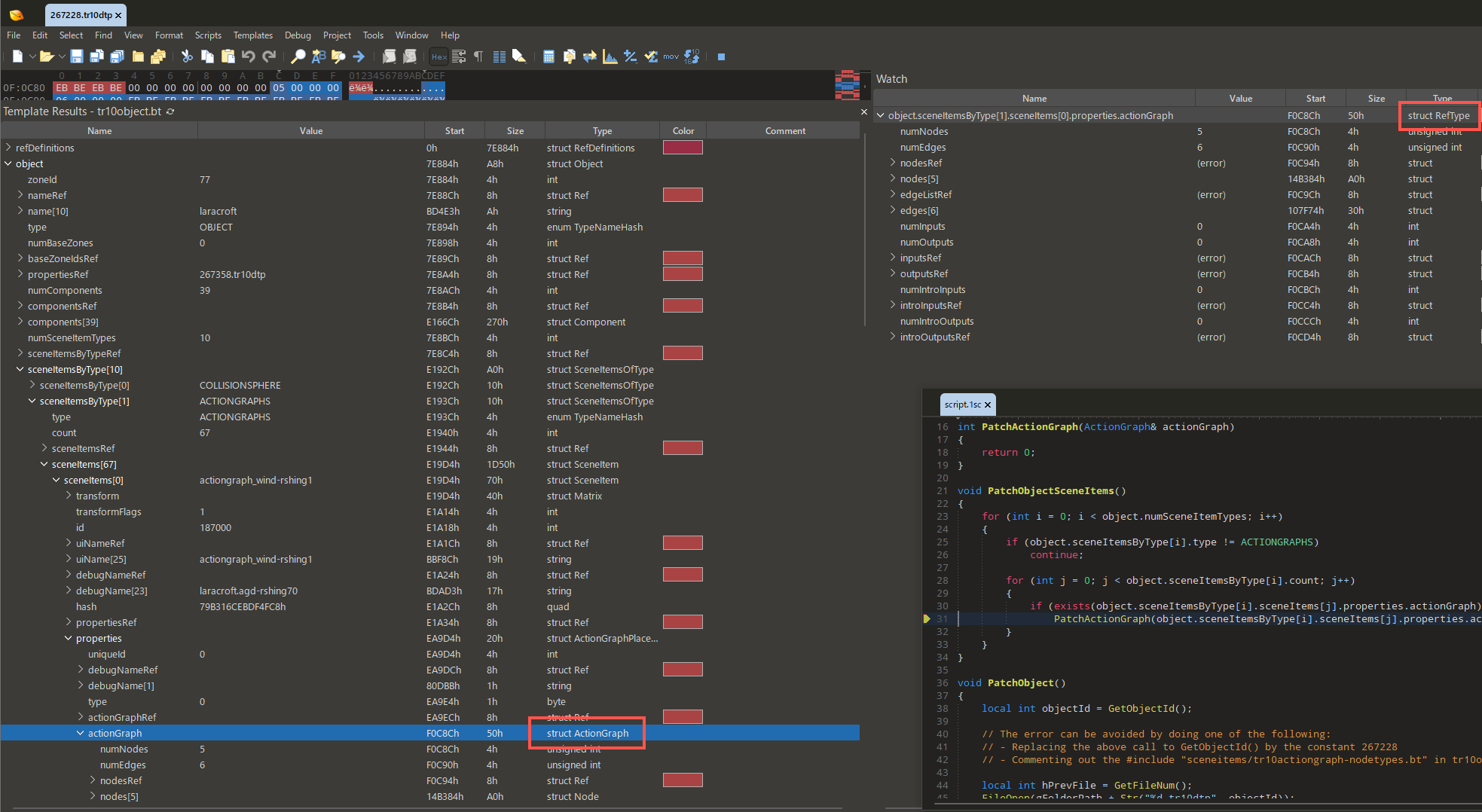
The screenshot below shows a script being debugged. As visible in the watch window, it thinks that the actionGraph field has the type struct RefType, but this is incorrect: the real type in the template is ActionGraph, and RefType is actually an enum, not a struct.
I tried to minimize the code as much as possible while still reproducing the error. Please use the following and run script.1sc. It’ll fail with the error For function 'PatchActionGraph', argument 1 was an incompatible type, even though the argument type is (should be) very much correct.
As also mentioned in the script, the error can be avoided by doing one of the following:
Skipping the call to GetObjectId(), which opens a separate file, runs a template on it, and closes it again.
Or, removing an #include directive that loads a large but unused enum.
Even when skipping GetObjectId(), however, it’s still possible to get a different bug:
Add a watch for the expression object.sceneItemsByType[i].sceneItems[j].properties.actionGraph
Place a breakpoint inside the function PatchActionGraph().
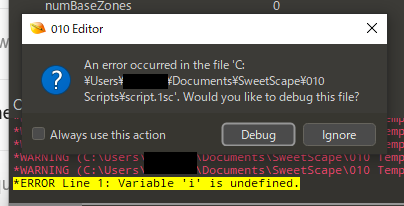
Run the script. Because i and j don’t exist when the breakpoint is hit, we would expect the watch to simply say so - but instead, we get a whole error popup:
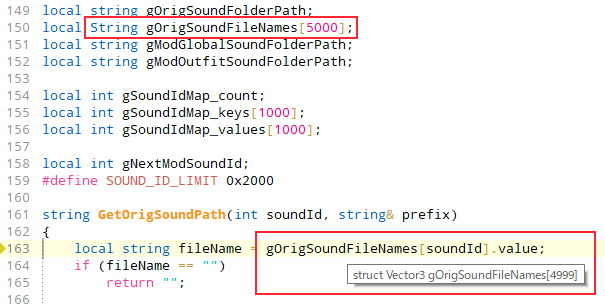
Apparently this bug is not limited to function calls and can also change array sizes. In the below screenshot, 010 throws a datatype mismatch error, even though String.value is in fact a string field.
The mismatched types problem was caused by a fix for the ‘Scripts “forget” their own types after calling RunTemplate()’ forum topic. Basically calling ‘RunTemplate’ is quite complicated because it binds to a whole new set of types from the target template. Originally this replaced any type definitions from the current script. We tried to make a change to allow a script to bind to types from multiple files (itself and other templates) but this caused problems. We can fix it, but it requires a fair number of changes to the type system that will probably have to wait until a major release such as 17.0 so that we can go through a full testing cycle. For now, we have reverted so that calling ‘RunTemplate’ binds to the types from just that template and loses the types from the current script: http://download.sweetscape.com/010EditorWin64Installer16.0.2f.exe If your script needs to access it’s own types, as a work around, those types would have to be placed inside the template until we can get this working properly.
This update should fix the issue with the debugger being started when a watch accesses an unknown variable inside an array. The error message could be improved but at least it won’t crash for now. The type mismatch should be fixed but let us know if you run into any problems with this.
The reduced script that I attached here no longer fails with build f, but I’m afraid that the full script still has the error shown in the last screenshot (where 010 Editor decides that Strings are now Vector3s and an array of 5000 items now only has 4999).
What’s more, that screenshot was taken in the public release 16.0.2, which suggests that this problem predates the “Scripts forget their own types” fix done in 16.0.2c.
Please find a somewhat less reduced version of the script and related files on my Dropbox (grown too big to attach here).
I understand that the script is not supposed to work with the current limitations - it still tries to use its own local types after calling RunTemplate(). However, in this case 010 isn’t forgetting types but mixing them up, so I think there’s something else going on.
As for the workaround of moving the script types into templates: putting them only in templates isn’t really an option, because then it’s no longer possible to use them for declaring global variables in the script. And putting them in both the templates and the script again causes the “Incompatible types” error, presumably because 010 is now mixing up the “script version” of the type with the “template version”.
(Also, would you have any feedback on my last post in the other topic?)
As an update to the above: it turns out the “Incompatible types” error in GetOrigSoundPath was actually caused by the string value; field not being initialized. I created a separate topic for this. If I explicitly initialize the field with an empty string literal, the error doesn’t occur and the script can successfully retrieve the sound file name.
We just put up an update http://download.sweetscape.com/010EditorWin64Installer16.0.2j.exe that should fix the assigning to empty strings problem. This update should also fix the array size incorrectly being displayed as 4999 instead of 5000, and I believe this only happened for the hint popup. The problem with the types being mixed up is the result of the aforementioned issue with binding types after calling RunTemplate. I’m not sure if there is an easy work-around and this might have to wait until we can revamp the types system in v17 to work properly.
Thank you for the new build - I can confirm that the array size is now displayed correctly.
As a workaround for the type mixup, I ended up replacing the String array by a big flat char[] buffer. And now that I know more about how the type system currently works, I should be able to sidestep the error in future scripts.