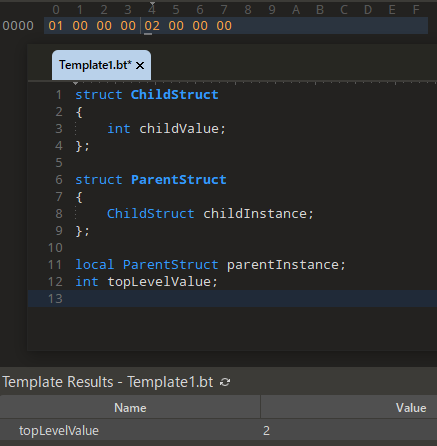
In continuation of this previous bug where scripts lost track of template types, it turns out that (also?) in the latest 010 Editor, they lose track of their own types.
test.bt →
struct TemplateStruct
{
    int value;
};

TemplateStruct templateStruct;
And another one: nested structs in scripts apparently don’t work.
struct StringWrapper
{
    string value;
};

struct StringList
{
    int count;
    StringWrapper items[1000];
};

local StringList gMyList;
This results in the following error at the declaration of items: “Structs must be declared with ‘local’ keyword in a script or see ‘RunTemplate’ function to execute a template from a script.”
Nested structs are supported in scripts but you have to use the ‘local’ keyword inside the struct like this:
struct StringWrapper
{
    string value;
};

struct StringList
{
    int count;
    local StringWrapper items[1000];  // <- need local here
};

local StringList gMyList;
Yes, that build fixes the error, and I also can’t reproduce the crash anymore. Thank you for the fast turnaround.
For nested structs: I see, but it still seems a bit strange that local would be required for the field. Why is it not enough to place it at the top-level structure instantiation (gMyList)? Why is it needed for structure-typed fields but not for primitive ones? More generally, it’s my understanding that scripts can only have local variables, so doesn’t that make the keyword redundant? (The official example doesn’t use it either.)
Actually, this made me curious to try out nested local structures in templates, and sure enough, those have unexpected behavior too: we can create local variables that advance the file pointer.
In our system, a local struct can currently contain a non-local struct. This was our original design but we could revisit this and see if there is a good case for forcing all nested structs to local. Right now we allow the user to decide if nested structs are declared local by using the ‘local’ keyword. Structs created inside scripts must be local and in this case we force the user to use the ‘local’ keyword but we could perhaps automatically infer this in the future.
OK, thank you for the explanation and for considering the change. To me, it would indeed make more sense if a local variable made the fields of the entire “structure tree” local, not just the fields of the top-level structure. After all, that’s also what happens in C - the nested structures of a stack variable are also allocated on the stack, not on the heap.