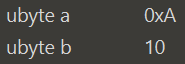
And with the first ubyte of the file containing 0A, you will see:
Showing that it always displays in decimal format, instead of respecting the users selected display format (in this case, hexadecimal format with 0x prefix).
Additionally, it would be nice if a built-in function was added for knowing the currently set Hex Display Format option in a script/template. This exists for the other two display format options, Default Date Format (GetDefaultDateFormat) and Default Time Format (GetDefaultTimeFormat).
Yes, you are correct that read functions that return a variable do not currently respect the user’s chosen display format. We’ll get this fixed up for our next release. For checking the current display format there is a function ‘GetDisplayFormat’ but are you looking for this to work differently?
By Hex Display Format, I’m referring to the option located in Options -> Inspector/Tables, which allows for changing the display format of a hexadecimal number (h suffix, 0x prefix, or no prefix/suffix at all).
As an extension to this issue, GetDisplayFormat also ignores the users selected display format, and instead just always returns DISPLAY_FORMAT_DECIMAL.
EDIT: Also, as a note, by “users selected display format”, I am specifically referring to what the Column Display Format for the Value Column is set to, since that is what the read attribute affects. Though, a potential problem - both the Variables and Template Results windows are separate and have independent Column Display Format settings.
Yes, GetDisplayFormat just returns the custom display format set for a variable with SetDisplayFormat, and does not return the display format chosen by the user for a column. If the user chooses a column display format other then ‘Default’, that display format overrides any format set with SetDisplayFormat. We could provide a function that returns the current column display format but you are correct that could be a different value depending upon if the Template Results or Variables tab is used.