This is not a problem report or even a request for any specific feature. I’m just curious:
(Before continuing, is there any semantic distinctions between “constants”, “variables”, and “symbols”?)
The reference manual describes several special symbols that are associated with where 010 Editor stores certain types of files. The ones I’m aware of (probably not an exhaustive list)
($BASEDIR)(called a “constant”)($SCRIPTDIR)(called a “variable”)($TEMPLATEDIR)(called a “variable”)($SCRIPT_REPOS_DIR)(called a “constant”)($TEMPLATE_REPOS_DIR)(called a “constant”)($SYNTAX_DIR)(called a “constant”)($SYNTAX_DLL_DIR)(called a “constant”)($PROGDIR)(called a “symbol”)
I see that ($TEMPLATE_REPOS_DIR)is used below:
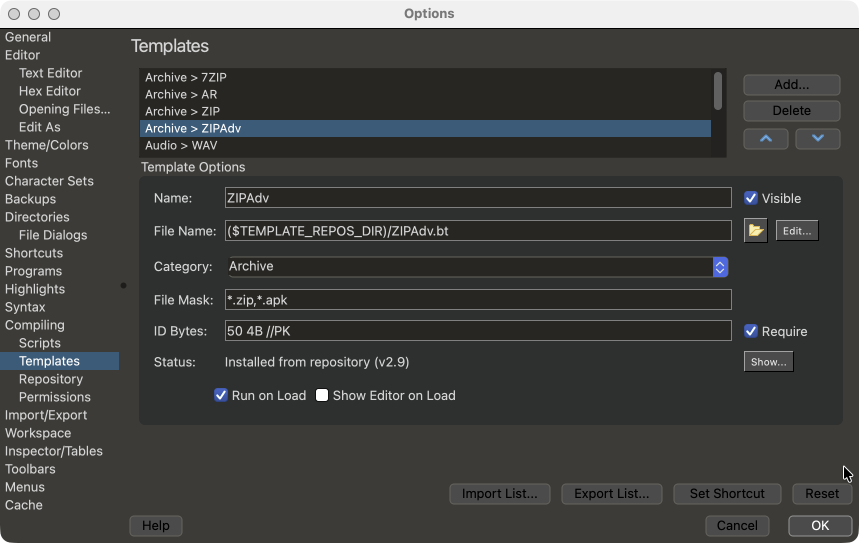
I haven’t needed to use any of them so far, but($TEMPLATE_REPOS_DIR)looks interesting
So a Template’s Options settings can specify an alternate repository by using a string other than ($TEMPLATE_REPOS_DIR) in the File Name field? I wonder if there might be un-obvious implications of doing so? (I can always try it, I guess!)
It seems apparent that scripts and ($SCRIPT_REPOS_DIR)and syntaxes and their associated constants would behave analogously.
Have you thought about implementing something analogous for projects/workspaces, or about a more general-purpose scheme to allow users to define and use their own symbols?